
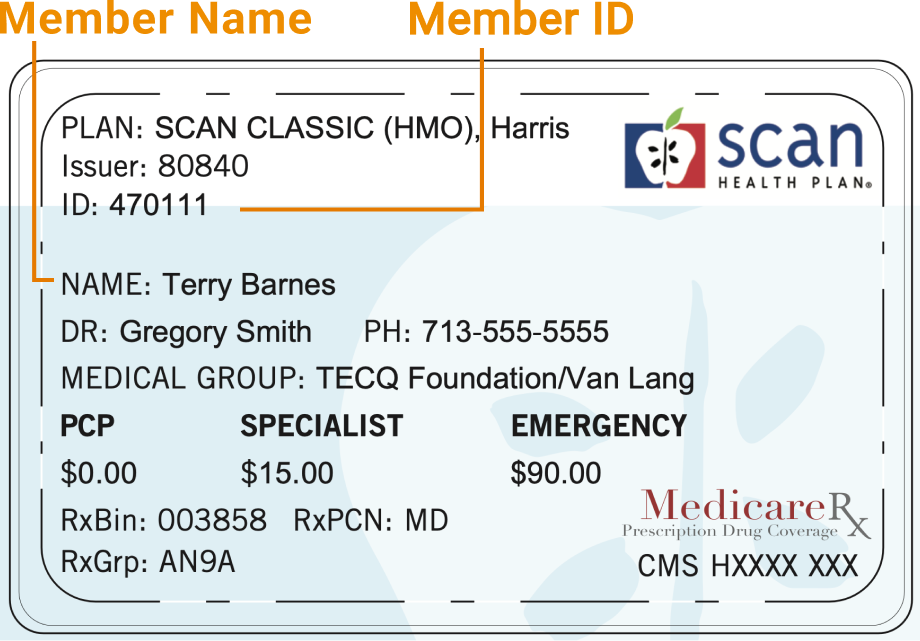
Example Member ID Card
How to Read Your SCAN Member ID Card
Your SCAN Health Plan member ID card contains important information you’ll need when visiting your doctor, filling prescriptions, or contacting customer service. Here’s how to understand each section of your card.
Member Name
Your Member Name appears on the left side of the card, usually next to the label NAME:
This identifies who the card belongs to and should match the name on your Medicare or insurance records.
Member ID Number
Look for the line labeled ID: near the top of your card.
This is your unique SCAN Health Plan Member ID.
You’ll need this number whenever you:
-
Make an appointment with your doctor
-
Fill a prescription at the pharmacy
-
Contact SCAN Health Plan for support
Plan Information
Under PLAN: you’ll see the name of your plan — for example, SCAN CLASSIC (HMO).
This tells providers what type of Medicare Advantage plan you have and determines your coverage and network rules.
Primary Care Physician (PCP)
The DR: line lists your Primary Care Physician (PCP), who coordinates your care.
Their contact phone number appears next to PH:
If you need to change your PCP, contact SCAN Member Services.
Medical Group
The MEDICAL GROUP: section shows which group manages your care — for example, TECQ Foundation / Van Lang.
This group ensures you have access to your network of doctors, specialists, and hospitals.
Copay Information
The bottom section displays your copay amounts:
-
PCP: The amount you pay for visits to your primary care doctor
-
Specialist: The amount for visits to specialists
-
Emergency: The amount due for emergency room visits
Prescription Information
The lines labeled RxBin, RxPCN, and RxGrp are used by pharmacies to process your prescriptions under your Medicare Part D plan.
💡 Tip: Keep your SCAN ID card with you at all times. You’ll need it at every appointment and when filling prescriptions.
For questions about your SCAN Health Plan coverage, contact Member Services at the number on the back of your card.